2021-04-23

Exponential Moving Average Calculations in SQL Server

Financial systems use a large variety of different analysis functions to identify trends and provide other derivations from periodic price or volume data.  One of these is the Exponential Moving Average (EMA), which provides a price average where more recent periods are weighted more significantly than older periods.  I'm going to demonstrate a way this can be calculated in SQL Server's T-SQL in a set-based way.

The EMA has only one parameter, which is a number of periods from which the weighting value is calculated.

The calculation is:

weight = 2 / ( number of periods + 1 )  [which will yield a value between 0 and 1]

EMA = CurrentPrice * weight + PreviousPeriodEMA * (1 - weight)

    = p0 * w + EMA1 * (1 - w)

where p0 is the price for the current period, EMA1 is the EMA value for the previous period, and w is the weighting factor.

As each EMA is calculated from the previous EMA, most solutions calculate this iteratively, but it can be calculated in a set-based manner.

2021-04-22

Row Generation in SQL Server

While writing complex queries for SQL Server, I have often needed to generate a specific number of records in order to solve a problem in a set-based manner.  At times like this I reach for a trusty Row Generator functions (also referred to as a "numbers table").

Here is a simple implementation of a row generator as a table-valued function:

2021-04-12

Certificate Deep Dive - Part 1 - What's a Certificate?

[Nothing to do with the Operating System at the moment I'm afraid, but this is an article I have wanted to write for a while.]

A few years ago, if you had asked me what technical subjects felt I should know more about, I would have said Time ZonesCharacter Encoding, and most definitely Certificates, which we'll look at today.

Despite their widespread use and amazing utility, the lack of good information and the obscurity of the tools for working with them lead many software developers to never grasp the benefits of them.  Over the next few posts, we'll do a deep dive into Certificates and attempt to cover off as much information as possible to give a good grounding and reference of what certificates are, why you might want to use them, and much more besides.

So buckle up, everybody, this is going to be a long few articles just because there is a lot to cover.  This first one is broken down into a "Question & Answer" form where the questions should logically follow each other and each adds progressively more detail.  I have tried to ensure that everything in here is correct and isn't misleading, but I can't be held liable for anything you do with this and you're encouraged to do your own research as well.

[Speaking of character encoding, if you want to weep for the species about how little software developers understand the topic, this StackOverflow Question is a disturbing read.]

2017-04-17

2017-04-17 AtomicityCodec Introduction

AtomicityCodec is an XML-based grammar designed for declaratively specifying the outline structure of a file.  I have been working recently to create it to fill a number of roles within my OS.  This is a long post to explain the what and why, but I'm leaving the actual technical details of the grammar for a future post.

The grammar is designed to achieve the following goals:

  • Define a wide variety of file formats including filesystems.
  • Provide a first-level parsing of files for an associated codec to then use a reference for further parsing.
  • Provide a means of identifying a file based on its content.
  • Serve as a basis for an "intelligent" hex viewer, which will have applications beyond AtomicityOS.
  • Provide a means for basic file format or minor variant of an existing format to be added to the system without needing to write any code.
  • Design a binary file parsing grammar that will have uses to a wider audience than just myself.
  • Possibly have the format usable to save out files as well as load them.

Background


I have long been interested in file formats, and always wanted a means to easily define, modify, and play with files in an easy and responsive manner.  There are a few hex viewer tools on the market that allow a structure definition to be applied to the data to visualise or extract values, but these tend to be rather limited.  A number of groups have attempted to create a grammar to describe a binary file format, but these projects have either been abandoned, or commercial with a limited usefulness.  So I have defined my own grammar (as with everything else) which is still evolving (I'm considering adding iterative loops) but is sufficiently complete to describe a host of formats in a breadth-first manner.  This grammar allows me to make ad-hoc changes to how the structure of a given file is parsed and to see the results of those changes in real-time.

2016-10-10

2016-10-10 Thread Synchronisation

I went back to an old kernel (the DriveAccess kernel from 2011) to review the code I created for the network stack there.  It wasn't anything fancy, it could send and receive UDP packets, and could respond to ICMP pings.  I had a function set up in the kernel so that it could download files from the TFTP server and display them, but the rest of the kernel wasn't complete enough to really take advantage of it.  For one thing, it was only a single thread with interrupts.

Having kernel threading now working, I set about researching the BSD Socket library and working out how best to fit an implementation into the kernel, particularly with a loopback interface so that I could create a server thread and a client thread and let them talk.

Unfortunately, I didn't get far down this road before I really needed some good old fashioned thread synchronisation.

The Basics


Interrupts can happen at any time, they don't care what you're doing, they will interrupt the currently running code and let some other code run for a while.  That's all well and good until you're half-way through updating some structure, you get interrupted, then the next task tries to read that data and finds it broken.  Bad things ensue.  In SQL Server, there are lot of fanciful things such as transaction isolation levels and snapshots and whatnot to assist you in not reading half-written data unless you really want to.

2016-09-25

2016-09-25 Kernel Threads and VT100 Console

The Ring 3 test from yesterday is useful and proves the TSS, but the rest of my OS is not quite set up yet to handle everything from process space with system calls and protected memory and the like.  What I really need is a way to run multiple tasks that are within kernel space.  What I need is KERNEL THREADS!

Because I already have much of a window manager in place, I made a quick change to the kernel main function so that instead of just opening a window for the console, it opens two more windows.  My test case is then a couple of functions which write characters into those other windows with a delay of of a few thousand nops, which will then get set to run as separate threads.

The method signature for the function to create a kernel thread looks like this
int32 process_kernelThreadStart( void* pThreadStart, size_t pStackSize, int32_t pParamCount, ... );
It allocates a stack for the thread and copies the parameters from its own stack into the thread stack it just allocated.  It also writes the address of a termination function to the stack so that if the thread function ever exits, it "returns" to termination function is called which collects the return value and terminates that thread.

2016-09-24

2016-09-24 More Multitasking

A significant feature of many operating systems is the ability to multi-task.  You may be running Calculator and Sound Recorder and Wordpad and Sticky Notes and Doom and Paint and Command Prompt and Clippy, but they aren't actually running at the same time in the processor.  Instead, the processor is very quickly switching between them (with each running for maybe a few microseconds at a time) to make it appear if they are happening at once.

My multitasking system will be what is called pre-emptive multitasking, which is where the OS uses interrupts to pause the running programme in order to switch to the next programme.  This means that the programmes can be written as if they're the only programme on the system, the kernel takes care of the heavy lifting, and the programmes aren't usually aware that they were even interrupted.

Before I could design the multitasking system (or even fully understand a lot of the tutorials and articles on designing a multitasking OS) I had to go back and do a lot more research to get a solid footing in the concepts (hence the confused previous post).

2016-08-21

2016-08-21 Multitasking

One of the last big hurdles to conquer before my kernel can have "v1.0" stamped on the packaging is that of multitasking.  There's a lot of theory to cover off and a specifics for the x86 architecture to grasp before it can be done, so ... to the Vroomster!

Context Switching


The biggest part of multitasking is being able to switch context.  This is when the processor decides to stop what it is doing, record the state of where it got to with the current task, fetching where it got to with a different task, then carrying on.
In order to do this, we need to store and restore the Processor Registers, the Stack, and the Memory Space,  These aren't all necessarily required, of course, restoring the registers can mean switching the stack or the memory space, and switching the memory space probably means you've replaced the stack.

So we need to make sure we understand which of these things we need to store and restore for specific circumstances, and how we get to them.

When we're switching context, we're likely to need to do this for two reasons; we are surrendering the context voluntarily (maybe because we're waiting for some IO operation before we continue), or an interrupt has happened (either a device requires attention, or the PIT has indicated that our time slice is up).

Registers


This is the biggest part of the context switch that we need to worry about, so let's make sure we don't miss anything.  We're a 32-bit operating system so the registers we need to worry about are:

  • General Purpose registers: EAX, EBX, ECX, EDX
  • Index Registers: ESI, EDI
  • Instruction Pointer: EIP
  • Flags: EFLAGS
  • Stack Registers: EBP, ESP
  • Floating Point / MMX registers: ST(0) to ST(7)
  • Segment Registers: CS, DS, ES, FS, GS, SS
  • Descriptor Table Registers: GDTR, IDTR, LDTR
  • Task Register: TR
  • Control Registers: CR0 to CR4, MSW
  • SME Registers: MXCSR, XMM0 to XMM7
  • Debug Registers (what are these?): DR0 to DR3


Next up, when might we need to persist these registers?  Well, there are two instances where persisting registers may be needed; when an interrupt occurs, or when the process surrenders the processor.

We'll look at the interrupts first because the interrupts persist some of the registers to the stack anyway, so it's quite likely that if we're going to have a function to surrender the processor, it's going to want to do exactly the same thing as the interrupt handler.  If we can achieve this, then we don't need a special function to reinstate a process that surrendered context differently to one that was pre-empted.

Looks like when an interrupt fires, the CPU persists the EFLAGS register, and the instruction pointer (EIP) as the return address.

I wonder if we can implement the "process surrendering control" as an interrupt itself?  Possibly, but as most process surrendering will be waiting for an IPC message, the process is going to be in the kernel anyway when it surrenders.  So most processes will be making a request of the kernel, the kernel will be suspending the process.

There's also the question of privilege level rings, which in the x86 world are from ring 0 (highest privilege kernel stuff) to ring 3 (lowest privilege userland).  When interrupts fire, the kernel has to change stacks and do all sorts of black magic (apparently) to maintain security.

I think maybe more research is needed on the basics of the processor architecture, particularly around interrupt handling between ring levels.  Maybe I'll put a pin in this and come back to it later.


2016-05-22

2016-05-22 Recent Progress Update

I haven't posted an update in a while because I haven't had a lot of time to dedicate to my OS unfortunately.

Instead, most of my free time in the last year or so has been spent learning about and investigating newer .NET web technologies and how the Microsoft web development stack is changing.  That said, I have spent some time working on Atomicity and have advanced the plot on a few angles.  I'll write these up in full in future, but here are the headlines.

2015-06-14

2015-06-14 Virtual Memory

Up until now, all of my kernels have had flat, physical memory models.  This has been useful before now because it has simplified the development of many components, not least of which being the device drivers which often need to provide physical addresses to devices, or to map physical buffers into their memory space before they can be accessed.  I can have multiple tasks running at the same time in this model by using what other systems would call multi-threading.  (I have some test kernels from some time ago where I added multi-threading support and could run multiple tasks at once, but these were limited to writing a character to the screen then waiting for some time.)

I now want to break that boundary and make my kernel more mature by introducing full multi-processing abilities with multi-threading and potentially "Thread-local Storage" (an area of data and/or bss in the executable that is copied per thread so that each thread can have global variables that are separate from any other thread).  To introduce multi-processing, I really need to get virtual memory working.

I posted an article last month about broadly how I was planning to implement this, much of that was actually so I could get the ideas straight in my mind before I tried to do it.

I have now implemented the the first part of that plan.  The kernel is now linked to address 0xC0100000 (3GB+1MB) and gets loaded by the multiboot loader to 1MB physical.  This is all achieved using the linker script (linker.ld) but with a few modifications:

SECTIONS
{
 . = 0xC0100000;

 .text ALIGN(4K) : AT(ADDR(.text) - 0xC0000000)
 {
  *(.text.multiboot)
  *(.text)
 }
 
 ...

The ". = 0xC0100000" sets the linking address to be where I wanted it (3GB+1MB), so when a function call or other JuMP in my code tries to jump to an absolute memory address, it jumps to somewhere in the range 0xC0100000 to 0xC0164000 (the approximate current start and end of my kernel).  If I only did this, the multiboot loader would have tried to load the kernel to that location in physical memory which would have been bad, there could be device memory, BIOS structures, or even nothing at all at that PHYSICAL location (especially if you have fewer than 3GB of RAM in your machine).  That's where the next modification to the link script comes in which is the AT() directive which tells tells the linker to create an executable which loads the section to the given PHYSICAL address (in this case, we subtract 3GB from the address, so 3GB+1MB becomes 1MB).

With these two changes, the multiboot header will still load the kernel to 1MB PHYSICAL, and all the JuMPs in the code will point to somewhere above the 3GB+1MB mark.

The linker script is also responsible for telling the program loader where to start executing the program via the ENTRY() directive.  Because this address will be called before paging is enabled, it needs to be changed to be the physical address of my entry point (the first piece of my OS code which will run when the system is booted).  In my boot.s assembly file (which contains the entry point), I have this code:

.global _start
.global _start_p

.set _start_p, _start - 0xC0000000

.text
_start:

I define two symbols here, _start is the symbol for the actual entry point (which will be at 0xC0100000 somewhere), and _start_p is the symbol for the physical address of the entry point (at 0x100000 somewhere).  The ENTRY() directive in the link script now references _start_p.

The last place changes were needed were in the actual _start function itself.  It needs to set up paging and I also put the page directory in here.  Here it is in completion:

.text
_start:
 # Load the physical location of the page directory.  This has to map the kernel to the 1MB mark, and to the C1MB mark at the same time.
 mov $boot_page_directory - KERNEL_ADDRESS_V, %ecx
 mov %ecx, %cr3

 mov %cr0, %ecx   # Set the paging bit in CR0
 or 0x80000000, %ecx
 mov %ecx, %cr0

 movl $kernel_start, %ecx
 jmp *%ecx   # This makes an absolute jump to the virtual 0xC0+1MB


.section .data
.align 0x1000
boot_page_directory:
 # This entry is 0MB to 4MB (0x0 to 0x400000 of 0x100000000)
 .long ( boot_page_table - KERNEL_ADDRESS_V ) + 7
 .rept 767
 .long 0
 .endr
 # This entry is 3GB to 3GB+4MB (0xC0000000 to 0xC0400000 of 0x100000000)
 .long ( boot_page_table - KERNEL_ADDRESS_V ) + 7
 .rept 254
 .long 0
 .endr
 # This is the last 4MB, which references the page directory itself
 .long ( boot_page_directory - KERNEL_ADDRESS_V ) + 7

.align 0x1000
boot_page_table:
 # Each entry in here represents 4KB of this 4MB.
 # This page table is used for both the 1MB and the 0xC0+1MB page directory entries
 .set page_table_count, 7  # Set the initial flags value
 .rept 1024
 .long page_table_count   # Set this page table entry
 .set page_table_count, page_table_count + 0x1000  # Then increment the value for the next time around.
 .endr


As you can see, the code is minimal.  It loads a special CPU register (CR3) with the address of the Page Directory, then it sets the PAGING bit of another special CPU register (CR0), and finally jumps to the virtual address of the kernel's first C function.

I've specified that both the page directory and page table should be in the "data" section of the program using the ".section .data" directive, and also that they should be aligned to a 4KB boundary using the ".align 0x1000" directive.  I then build the two tables using the ".rept" directive to repeat values as many times as I need, in the directory to repeat the 0 entries, and also in the page table to create an identity mapped page table.

That's it, all done, paging is set up and every works beautifully ...except it doesn't.  As ever, I encountered problems getting it to actually work.

The first was an easy problem, the memory manager added a big chunk of physical memory to the free list ready to be used by the malloc() routine, but I couldn't access that memory any more.  I modified the memory manager initialisation code so that it added the chunk of memory from the end of the kernel to the end of the mapped 4MB, giving the kernel approximately 2.5MB of memory available for use.

The second problem was an odd one that I don't quite understand yet.  I use LGDT and LIDT instructions to load the Global Descriptor Table (GDT) and Interrupt Descriptor Table (IDT) as you do, but both these commands stopped working when I enabled paging.  For some reason, when I passed the LGDT instruction the memory address of the GDT Descriptor directly, it didn't work with paging on (even though it worked with paging off, unless I'm going mad).  After a while of going through the disassembly and trying various different things, the only way I found to get it to work was to load the GDT address into a register, then pass the register to LGDT as a memory reference, like so:

uint32* lPhysicalAddress = gdt_gdtDesc;
asm("lgdt (%0)" : : "r"(lPhysicalAddress));

The same was true of the LIDT instruction, fixed in the same way.

The last problem was another odd one.  Many months ago when I first got Doom running, I had a problem on one of my test machines where Doom failed to load with an issue that I traced back to being a problem with FPU, and I added an instruction to the kernel load to reset the FPU with "asm("fninit");".  With Paging enabled, this instruction failed with an Interrupt 7, but commenting the line out made it work again :)  I suspect that the FPU makes use of some area of memory for caching or stack or some such which doesn't work with my current paging set-up.  It is something to investigate another day.


With all of these obstacles overcome (or at least worked around), the kernel is back to booting to a console, but with everything running in virtual memory.  With the console restored, it allows me to work toward getting the physical page allocator and page fault handler in place gradually allowing me to test each part as I write it.  I prefer this approach rather than having a non-functional kernel until everything works correctly.

I have a lot of work still to do as everything I've written so far will need tweaking where it accesses physical memory.  The only reason the VGA driver is working at the moment is because of that 1MB virtual to 1MB physical map I added earlier, so even that needs changes.

Lots to do ...

2015-05-17

2015-05-17 Physical Memory Management

The general design I have chosen for the kernel is what is called a "Higher-half Kernel".  This is where the kernel occupies the uppermost portion of the memory space for each process.  This is good because the kernel is always at the same place in memory and programs can all be linked as if they were at the 0 memory mark, but it does mean the process and kernel memory have to share the memory space which, on a 32-bit machine, means dividing up only (only!) 4GB.

The kernel will be linked as if it always lives at the 3GB (virtual) mark, but the multiboot loader will load it at the 1MB (physical) mark.  The first thing my kernel has to then do is partially configure the virtual memory before the kernel code can perform any jumps or reference any global symbols, or generally run any part of the C kernel.  The easiest way to do this is to create a small assembly file which will contain the multiboot entry point which will do this configuration.  Assembly is a good choice because I can write it as if it was linked at 1MB where needed, and the linker won't mess with that.

The initial virtual memory configuration will be that the first 4MB of physical memory is mapped to the 3GB mark for kernel memory.  This is a good thing because the first 4MB contains some interesting things; BIOS areas, 16-bit DMA memory, and the kernel itself.  Also, the multiboot header data is quite likely to be in here, but if it isn't, we need to rescue it before it gets overwritten.  This 4MB allocation is also really useful because it gives us a little bit of available memory that we can use before we need to worry about getting more frames allocated.  (I will also, for the moment, map the first 4MB physical to the first 4MB virtual as well, but I don't intend for this to be the case long term.)

There are things we need to consider that are scattered throughout physical memory that we need to be aware of, such as; the multiboot header and its various tables, the ACPI tables, the E820 memory map result (although this is probably in the multiboot header data), etc.  We have something of a problem because we need to know what memory we can use for our kernel before we can actually find where these things are and then see if we've already overwritten anything important.  There isn't a way to do this unfortunately, other than to use a block of memory that is least likely to be used by other things yet.  Many OSes assume the 1MB mark (as I have done) which seems to be the safest, and as you increase the memory address, the probability of hitting something increases.  However, I have seen the 1MB mark used when using a network boot ROM in the past, if this becomes a problem, I may have to revisit it.

If we have less then 4MB of physical memory in the machine, we're going to have a bad time, so for now we'll just say that 5MB is the minimum physical memory for the OS.  This gives us the 4MB of memory for the kernel, and 256 pages of memory to be allocated where needed.  I could make the initial allocation for the kernel smaller to support a smaller physical memory requirement, but that's unnecessary for moment.  The reason for choosing 4MB as the initial kernel allocation is so that I can use a single page table to cover this (each of the 1024 page tables covers 4MB, making a 4GB memory space, in the 32-bit world).

Next thing we need to worry about is actually allocating physical memory.  The easiest way to track this is to set a pointer to the top of the 4MB physical that we have used already.  When we need to allocate a new page, we use the page at this pointer then inclement the pointer by one page.  It means for now that we can't reallocate pages or track their usage, but we have more physical memory that we need right now.  A kernel panic when we have run out of available physical memory will suffice for now.

My intention is eventually to create a physical memory map that mirrors the virtual memory map used by the i386 architecture, and use it to keep track of what goes where.  It can use a single page to store the top level data as 1024 32-bit entries, each of which either tracks a 4MB block of physical memory, or contains the address of a page which further breaks the 4MB down into 4KB pages.  Each entry, be it referring to a 4MB page or a 4KB page, tracks the time since this page was last accessed, and whether it is dirty (changed since it was last copied into the pagefile).  Incidentally, the reason that Windows seems to be constantly accessing your hard drive is because it is copying pages of memory that have changed (been written to by a process) from memory to the page file, just in case a process suddenly needs lots of memory.


2014-09-16

What the world needs is more Doom

Looks like I'm not the only one toying with getting Doom running on the metal.  This is a post from a security researcher called Michael Jordon who found that some Canon Pixma printers have a vulnerability that means they can have custom firmware uploaded to them, and that the ARM processor and LCD display on the printer is just about capable of running Doom ...

http://www.contextis.co.uk/resources/blog/hacking-canon-pixma-printers-doomed-encryption/

(For the record, my first thought was a 0x10 key, don't know where he saw a 0x30 key in that data  :p  )

2014-09-14

A Quick Catch-up

I've just published three older articles that I have had waiting in draft form for about three months because of work.  Apologies for the delay in these.  I have some more things to retrospectively post, then I'll actually get on and make some progress on actual code.

2014-05-31 Doom Windowing
2014-06-01 Input Events
2014-06-02 More Windowing Progress

2014-06-09

2014-06-09 Animated GIFs

While I was working through some of the significant changes to the windowing system to get input events and window painting working, I thought it might be useful to have something a bit more light-weight than Doom to be able to test some things (not that Doom takes long to load anyway).  I decided that getting images to load and display might be interesting, and I thought what better place to start than with animated GIFs (pronounced with a soft 'G' apparently, as in "Jug").

Examining all the GIF89a specifications, I was surprised to find that GIF files can easily have more than 256 colours per frame, and the fact that most graphics tools limit files to 256 colours is because they're poor implementations of the standard.  That said, there is a question on how many programs could correctly read and display such a GIF (mental note: test major browsers for support).

Opening the files and working through the general container format for the GIF files was no different to any other graphics file format, the two really interesting parts are the multiple images per frame (how you get more than 256 colours per file and optimise animations) and the LZW encoding for the images.

When dealing with GIF files, each file contains a number of logical "screens" which are animation frames (one for a static GIF, multiple for an animated GIF), then each "screen" is built up of one or more "images".  Each image provides a part of the screen image, so you could tile multiple images to make up each screen (each frame of animation).  Each image has a palette limit of 256 colours, so by tiling as many "images" as you need to make up each "screen" you can easily get more than 256 colour GIF files.  Most files, however, only use a single "image" per "screen" and are therefore limited to 256 colours.

The LZW encoding is more intricate, and there is a lot of conflicting and incomplete information on exactly how you go about interpreting the data.  Because of this, I'm not going to go into detail on this until my implementation is complete to the point of working with all of my test images.  Be aware that a lot of code posted on the internet under the heading of "LZW Decoding" is actually the GIF-specific variant of LZW coding.

Because the graphics output is the same window-system method as Doom is using, all the output is already in-place and tested, as long as I can build an appropriate Bitmap structure from the image data, and I get dithering for free if required.

Such poking and frustration later ...


Yes it does animate, but you'll have to take my word on that for now.  I could create an animated GIF of my OS playing an animated GIF for you all to enjoy, but not today (Yo dawg, I heard you like animated GIFs ...).  You can still see the section of border to the left of the graphic is still being overwritten, that's the VGA driver blitting routing still not supporting masking correctly.

I have a host of other animated GIF images, including some simple ones that Leah made for testing, but not all of them work.  Some of them run the system out of memory (it only has a few meg for the memory manager at the moment), some of them have LZW coded data that causes my LZW decoder to fail (still need to find out why).

At some point, the code for loading the GIF files (currently incorporated into the Hello World test app) will be extracted out and built into a class to be loaded by the codec system, a part of the OS I'm really looking forward to writing  :)


One of the benefits of writing all your own window manager code, including the routine to draw the window chrome, is that I get to do things like this:


The Amiga Kickstart 1.3 window chrome faithfully reproduced, loading a GIF of the boot screen.  I also coded in another font that's closer to the Workbench standard.  It isn't Topaz, but it's close.

I'm very happy with that :)


(I think that's the last article I had to publish from before my three month break from development, hopefully I get to do some new stuff now.)

2014-06-02

2014-06-02 More Windowing Progress

Good progress today, fixed a lot of the smaller bugs which were obvious from the last couple of days, and also got two big blocks of functionality into the VGA driver to make things better.

One of the things I'll call a "small bug" is that I've thrown some hacky code in to the current keyboard handler to gather the key up and key down events for the important keys and push them into the window manager, which then adds the events into the event queue for the "active" window.  Because I can't currently select the "active" window, I have added a pointer to the "last opened window" (effectively the tail of the window list) to mimic this for now.  I've removed the test code which pushed input events into new windows, and Doom is actually now playable.


Completed:
- Added the ability to blit bitmap objects onto the screen via the VGA driver.  This means Doom is a lot faster again and has dithering back.
- Added an efficient DrawLine() function to the VGA driver.  This greatly speeds up the window drawing.
- Fixed the KeyUp and Keydown events being reversed.
- Fixed the window title text being drawn in the wrong place.
- Added backspace handling to the window console mode.

Next steps:
- Fix the console scrolling.
- Identify the bug in the keyboard handling.
- Get all drawing routines to use the back buffer to re-enable double-buffering.
- Add the masking support to the Plot8() function (Doom left border problem)
- Identify why the Mode 12h code doesn't work on the Netbook.
- Investigate sound.

2014-06-01

2014-06-01 Input Events

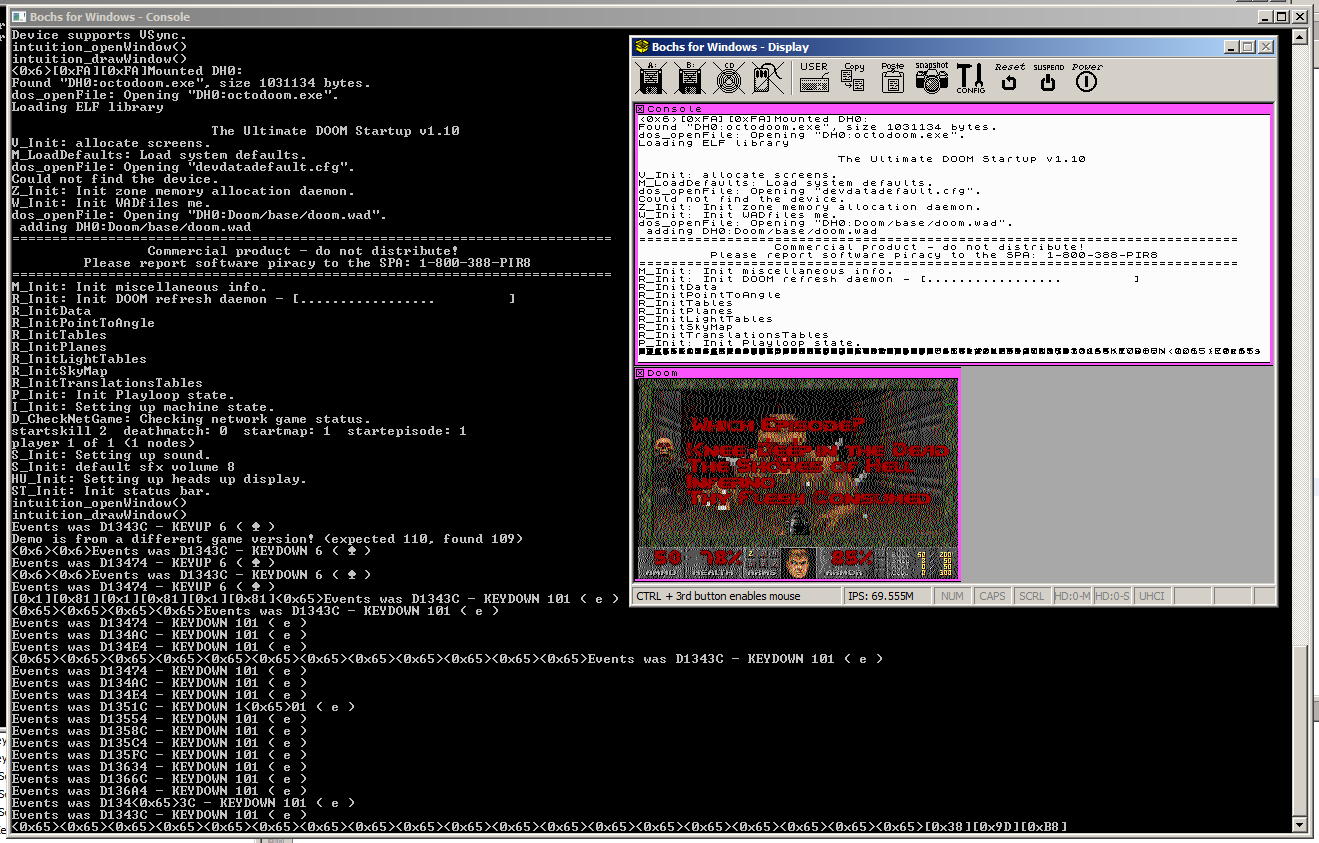
Recently, I've been thinking about the minimal required implementation for getting input events wired into the windowing system as well.  This is going to be a good step forward as I may actually be able to play Doom, rather than just watching the demos.  I also had a call with +Pi nk for assistance and support with working this through, many thanks  :)

The plan is to add a structure which represents a single input event which contains the event type (key down and key up to start with) and some data (which key), add a List to the window to store the input events, add a function to dequeue the next input event from a specific window and return it, and the window manager will need some method of getting keyboard events into the queue.

Reviewing how the Linux Doom source code processes input, it seems to fetch XWindow events in a similar manner, converts them into Doom input events, then calls a Doom function to push them into a queue.  I'll reinstate a version of this code, but wired to get the event using my new function and modified to convert from my event structure into the Doom event.

One note here is that the XWindows GetEvent() function blocks if there are no events to serve, and the Doom code calls a separate function to determine if there are events ready so that the game doesn't stop every frame waiting for input.  My function will return NULL if there are no events, so I'll need to adjust the code in Doom to account for this.

Having modified Doom to read and process the input events, I need to get some events into the queue.  Whilst I do have a PS/2 keyboard handler in the kernel, it's wired up to output ASCII values from key down events only, where as we need key up and key down events for all the keys, even non-ASCII ones.  In order to test the event pipeline and the event handling code in Doom, I've put some code into the OpenWindow() function to push some key presses into the event queue of the Doom window, specifically 'Escape', 'Enter', 'Enter', 'Enter' which should bring up the menu, select 'New Game', select the episode, then select the difficulty to start the game.


All this in place and it works a treat.  Doom loads, then goes into the menu, and starts the game, leaving the character standing at the beginning of level 1.  \ o /

(The screenshot is from a slightly later test where some keyboard events are wired in ... spoliers)

2014-05-31

2014-05-31 Doom Windowing

Found some time today to look at some things.  First thing to address is that since putting in the windowing code, Doom has failed to load and caused a recursive crash.  While I haven't actually tracked the cause of this, it only happens if I compile using my Debug_Map configuration (a build configuration in the project which outputs the link map during the build, useful for debugging).  It's probably something related to output directories or something, but I can work around it for now.

Before now, I had a special routine in the kernel library which accepted the kind of bitmap that Doom outputted and drew it to the screen.  With the windowing system progressed, this has been slightly modified to accept a pointer to the window structure as well.  Now, Doom calls OpenWindow() to create a window,  then calls this DrawBitmap() function each frame to actually put the bitmap onto it.  This new version of the DrawBitmap() function currently uses SetPixel() to draw each pixel on the screen one-at-a-time, which isn't fast, but should allow me to get things running and debugged more easily.

At the moment, the windowing system doesn't handle windows overlapping one another, or moving them, but there's plenty to do before worrying about minor things like that.  I also broke the USB Mass Storage driver at some point, so I had to track two small bugs in this before I could test this on real hardware.  I hadn't reset the USB port before calling SetAddress() against device 0, and I hadn't reset the transfer descriptor CurrentPage property between calls.

With these bits in place, Doom is running in a window on the screen, and is outputting the console text to the console window.


It's not fast, and it's not dithered currently, but it's working and running the Doom demos (I nearly know the demos off by heart now).

A few things stand out from this image which aren't quite correct

  1. The window title text for the Doom window is actually drawing over the Console window for some reason.
  2. The console text doesn't scroll, so when it gets to the bottom, it just overwrites the last line.
  3. Many other things :)


2014-05-16

2014-05-16 Graphics and Windowing

I've been working through putting in a skeleton windowing system in, although this has required a large rework of the graphics system.  This hasn't actually been a bad thing as it has given me opportunity to add a "Bitmap" structure.

So, what's so special about the bitmap structure?  Well, it starts off being the header of a generic, in-memory bitmap.  In this form, it has a width and height, it has optional palette information, it has details of the layout, format of the pixels and the "pitch" of the bitmap (the number of bytes per pixel row, including padding), and a pointer to start of the actual bitmap data.

Alongside the bitmap structure, we have graphics functions which accept a pointer to a bitmap structure and perform some operation on them.  The basic functions are:

bitmap_t* allocateBitmap( uint16 pWidth, uint16 pHeight, uint16 pPaletteSize, colourType_t pPaletteType );
void freeBitmap( bitmap_t* pBitmap );
uint32 getNearestPaletteEntry( bitmap_t* pBitmap, colour_t pColour );
void setPaletteEntry( bitmap_t* pBitmap, uint32 pPaletteEntry, colour_t pColour );
colour_t getPixel( bitmap_t* pBitmap, uint16 pX, uint16 pY );
void setPixel( bitmap_t* pBitmap, uint16 pX, uint16 pY, colour_t pColour );
void drawLine( bitmap_t* pBitmap, bitmap_t* pMask, int32 pX1, int32 pY1, int32 pX2, int32 pY2, colour_t pColour );
void drawRectangle( bitmap_t* pBitmap, bitmap_t* pMask, int32 pX1, int32 pY1, int32 pX2, int32 pY2, colour_t pColour );
void fillRectangle( bitmap_t* pBitmap, bitmap_t* pMask, int32 pX1, int32 pY1, int32 pX2, int32 pY2, int32 pColour );
void placeChar( bitmap_t* pBitmap, bitmap_t* pMask, font_t pFont, int pCharacter, int32 pX, int32 pY, int32 pColour );
void blitLocal( bitmap_t* pBitmap, bitmap_t* pMask, uint32 pSourceX, uint32 pSourceY, uint32 pWidth, uint32 pHeight, uint32 pDestinationX, uint32 pDestinationY);
void blitRemote( bitmap_t* pSourceBitmap, uint32 pSourceX, uint32 pSourceY, uint32 pWidth, uint32 pHeight, bitmap_t* pDestinationBitmap, bitmap_t* pMask, uint32 pDestinationX, uint32 pDestinationY);

I won't explain all of these in detail, but the non-self-explanatory parts ...

  • The mask is a binary bitmap the same size as the bitmap object, but the drawing routine can only alter a pixel in the given bitmap if the corresponding pixel in the mask bitmap is on.  Often though, the mask will be null, which means that no masking is to be performed.
  • The "nearest colour" functionality from the Displaying Images in 16 Colours article is also incorporated into the graphics function with the mapping table stored as part of the bitmap structure itself.
  • BlitLocal is for copying ("Block Transferring") a rectangle of bitmap to somewhere else in the same bitmap.
  • BlitRemote is for copying from one bitmap to another bitmap.


So, all very boring, why am I that happy with it?  Well, the bitmap structure also contains a series of function pointers for the same graphics operations and if these pointers are non-null, the graphics functions above will just call the given function (this is similar to the operations structure in the FILE structure in C).  These functions allow it to integrate very well with the windowing functions.

Still not getting it, okay, how about "every graphics device is represented by a bitmap structure"?  That do anything for ya?  It's polymorphism, Holmes!

Yes, each monitor / screen / graphics device is represented by a bitmap structure that is known to the windowing system, so drawing to the screen is as easy as drawing to any in-memory bitmap, and uses the same functions to do it.  If you want to draw a line on the screen, no problem.  If you want to "block transfer" (known as Blitting) a window bitmap to the screen, you call the graphics blitting routines.  If you want to read a section of the screen, you blit from the screen to a bitmap.

A graphics device which is using a memory-mapped framebuffer needs nothing more than the bitmap structure which defines the structure and location of the framebuffer.  If the graphics device is more complicated, or offers some form of hardware acceleration, it has a bitmap structure which provides functions for the various function pointers which the graphics routines call.  This is the case for the VGA Mode 12h driver because of its planar structure and requirement to use a windowing function to access the entire bitmap.

Each window in the system can have a bitmap to act as a back-buffer, but it doesn't need one.  If a program tries to draw to its window and it has a bitmap, the drawing routines draw to the bitmap, then if that area of the window is visible on-screen, the window bitmap is "blitted" (with a mask) onto the screen (or screens) with which it intersects.  If the window doesn't have a bitmap, the graphics routines are translated directly to the screen(s) with the mask bitmap set to account for the window being partially or wholly obscured by other windows.

A future enhancement for this whole caboodle is to incorporate the ability to add a 2D transform matrix to into the system at some point (not worked out where yet) so that bitmaps, windows, and even screens can be scaled, rotated, sheared, translated and whatnot to no end of amusement.  :D

Anyway, I'll leave you with a picture of what is currently the system console window with my beautifully hand-crafted window border design ...


(Did I mention the library system was working?)


2014-03-29

2014-03-29 Library Memory Mapping

I haven't posted anything for a while, there's a big project on at work which is taking up a lot of my time.

I've been thinking about libraries and how they will work, mainly in how the memory management will work in such a way that it will work for the library and the whatever the program is doing.

Having considered and investigated various approaches, I think I've come up with the best solution.

At the point the program starts executing, the kernel has set up an address space, and loaded the program text (the code) at address 0, followed by the data and bss (uninitialised data) as set by the executable file.  The stack of the program will have been set at some arbitrarily high address, such as the top of the address space.  The kernel will have set and be keeping track of the "stack break" value, which is the top of the heap.  This state is shown in A below.


Note that because this program was written in C, it has the appropriate C library has been linked into the program executable, and includes the malloc() function and memory management functions.  It's also possible that this program may have been written purely in assembly in which case it won't have a C library and will have some other form of memory management.

The first time that the program calls the malloc() function (or during the C library initialisation, depending on the library), the memory allocator in the program's C library will make a call to the kernel function sbrk() to move the break value up by a certain amount, maybe a few megabytes, as shown in B.  The memory allocator in the program will then use this space for any allocations needed by the program.  When this space has all been allocated, the memory allocator makes another call to sbrk() to get another part of the address space.

Imagine that the program now wants to load a maths library.  It calls the kernel function openLibrary(), requesting the library.  The kernel locates the library, and moves the break value of the process up again to secure an area of the address space for the new library, and loads it.  This is shown in C.

Note again that this library has also been written in C and linked to its C library, but this C library may be different to the one in the program in such a way as to be incompatible.  This would prevent the maths library from using the malloc() implementation that is in the C library of the program.

If the newly-loaded Maths library now wants to allocate some memory for itself, it will make a separate call to the kernel sbrk() function.  This returns another area of the address space, which the memory allocator in the Library then uses for allocations.  This is shown in D.

So, if the program now more space to use for more allocations, it can make another call to sbrk() which will return another slice of the address space pie.  This new space won't be contiguous with the previously allocated program memory space, but that's OK because the memory allocator in the program's C library won't worry about that.

All right, I think that's enough for now, I think it all makes sense and should work for any combination of programs and libraries, regardless of whether they're using the standard C library, a non-standard C library, or just some custom assembly for memory management, as long as they all behave and use sbrk() and openLibrary() correctly.  I know I haven't mentioned mmap() but it should follow the same rules.