2015-06-14

2015-06-14 Virtual Memory

Up until now, all of my kernels have had flat, physical memory models.  This has been useful before now because it has simplified the development of many components, not least of which being the device drivers which often need to provide physical addresses to devices, or to map physical buffers into their memory space before they can be accessed.  I can have multiple tasks running at the same time in this model by using what other systems would call multi-threading.  (I have some test kernels from some time ago where I added multi-threading support and could run multiple tasks at once, but these were limited to writing a character to the screen then waiting for some time.)

I now want to break that boundary and make my kernel more mature by introducing full multi-processing abilities with multi-threading and potentially "Thread-local Storage" (an area of data and/or bss in the executable that is copied per thread so that each thread can have global variables that are separate from any other thread).  To introduce multi-processing, I really need to get virtual memory working.

I posted an article last month about broadly how I was planning to implement this, much of that was actually so I could get the ideas straight in my mind before I tried to do it.

I have now implemented the the first part of that plan.  The kernel is now linked to address 0xC0100000 (3GB+1MB) and gets loaded by the multiboot loader to 1MB physical.  This is all achieved using the linker script (linker.ld) but with a few modifications:

SECTIONS
{
 . = 0xC0100000;

 .text ALIGN(4K) : AT(ADDR(.text) - 0xC0000000)
 {
  *(.text.multiboot)
  *(.text)
 }
 
 ...

The ". = 0xC0100000" sets the linking address to be where I wanted it (3GB+1MB), so when a function call or other JuMP in my code tries to jump to an absolute memory address, it jumps to somewhere in the range 0xC0100000 to 0xC0164000 (the approximate current start and end of my kernel).  If I only did this, the multiboot loader would have tried to load the kernel to that location in physical memory which would have been bad, there could be device memory, BIOS structures, or even nothing at all at that PHYSICAL location (especially if you have fewer than 3GB of RAM in your machine).  That's where the next modification to the link script comes in which is the AT() directive which tells tells the linker to create an executable which loads the section to the given PHYSICAL address (in this case, we subtract 3GB from the address, so 3GB+1MB becomes 1MB).

With these two changes, the multiboot header will still load the kernel to 1MB PHYSICAL, and all the JuMPs in the code will point to somewhere above the 3GB+1MB mark.

The linker script is also responsible for telling the program loader where to start executing the program via the ENTRY() directive.  Because this address will be called before paging is enabled, it needs to be changed to be the physical address of my entry point (the first piece of my OS code which will run when the system is booted).  In my boot.s assembly file (which contains the entry point), I have this code:

.global _start
.global _start_p

.set _start_p, _start - 0xC0000000

.text
_start:

I define two symbols here, _start is the symbol for the actual entry point (which will be at 0xC0100000 somewhere), and _start_p is the symbol for the physical address of the entry point (at 0x100000 somewhere).  The ENTRY() directive in the link script now references _start_p.

The last place changes were needed were in the actual _start function itself.  It needs to set up paging and I also put the page directory in here.  Here it is in completion:

.text
_start:
 # Load the physical location of the page directory.  This has to map the kernel to the 1MB mark, and to the C1MB mark at the same time.
 mov $boot_page_directory - KERNEL_ADDRESS_V, %ecx
 mov %ecx, %cr3

 mov %cr0, %ecx   # Set the paging bit in CR0
 or 0x80000000, %ecx
 mov %ecx, %cr0

 movl $kernel_start, %ecx
 jmp *%ecx   # This makes an absolute jump to the virtual 0xC0+1MB


.section .data
.align 0x1000
boot_page_directory:
 # This entry is 0MB to 4MB (0x0 to 0x400000 of 0x100000000)
 .long ( boot_page_table - KERNEL_ADDRESS_V ) + 7
 .rept 767
 .long 0
 .endr
 # This entry is 3GB to 3GB+4MB (0xC0000000 to 0xC0400000 of 0x100000000)
 .long ( boot_page_table - KERNEL_ADDRESS_V ) + 7
 .rept 254
 .long 0
 .endr
 # This is the last 4MB, which references the page directory itself
 .long ( boot_page_directory - KERNEL_ADDRESS_V ) + 7

.align 0x1000
boot_page_table:
 # Each entry in here represents 4KB of this 4MB.
 # This page table is used for both the 1MB and the 0xC0+1MB page directory entries
 .set page_table_count, 7  # Set the initial flags value
 .rept 1024
 .long page_table_count   # Set this page table entry
 .set page_table_count, page_table_count + 0x1000  # Then increment the value for the next time around.
 .endr


As you can see, the code is minimal.  It loads a special CPU register (CR3) with the address of the Page Directory, then it sets the PAGING bit of another special CPU register (CR0), and finally jumps to the virtual address of the kernel's first C function.

I've specified that both the page directory and page table should be in the "data" section of the program using the ".section .data" directive, and also that they should be aligned to a 4KB boundary using the ".align 0x1000" directive.  I then build the two tables using the ".rept" directive to repeat values as many times as I need, in the directory to repeat the 0 entries, and also in the page table to create an identity mapped page table.

That's it, all done, paging is set up and every works beautifully ...except it doesn't.  As ever, I encountered problems getting it to actually work.

The first was an easy problem, the memory manager added a big chunk of physical memory to the free list ready to be used by the malloc() routine, but I couldn't access that memory any more.  I modified the memory manager initialisation code so that it added the chunk of memory from the end of the kernel to the end of the mapped 4MB, giving the kernel approximately 2.5MB of memory available for use.

The second problem was an odd one that I don't quite understand yet.  I use LGDT and LIDT instructions to load the Global Descriptor Table (GDT) and Interrupt Descriptor Table (IDT) as you do, but both these commands stopped working when I enabled paging.  For some reason, when I passed the LGDT instruction the memory address of the GDT Descriptor directly, it didn't work with paging on (even though it worked with paging off, unless I'm going mad).  After a while of going through the disassembly and trying various different things, the only way I found to get it to work was to load the GDT address into a register, then pass the register to LGDT as a memory reference, like so:

uint32* lPhysicalAddress = gdt_gdtDesc;
asm("lgdt (%0)" : : "r"(lPhysicalAddress));

The same was true of the LIDT instruction, fixed in the same way.

The last problem was another odd one.  Many months ago when I first got Doom running, I had a problem on one of my test machines where Doom failed to load with an issue that I traced back to being a problem with FPU, and I added an instruction to the kernel load to reset the FPU with "asm("fninit");".  With Paging enabled, this instruction failed with an Interrupt 7, but commenting the line out made it work again :)  I suspect that the FPU makes use of some area of memory for caching or stack or some such which doesn't work with my current paging set-up.  It is something to investigate another day.


With all of these obstacles overcome (or at least worked around), the kernel is back to booting to a console, but with everything running in virtual memory.  With the console restored, it allows me to work toward getting the physical page allocator and page fault handler in place gradually allowing me to test each part as I write it.  I prefer this approach rather than having a non-functional kernel until everything works correctly.

I have a lot of work still to do as everything I've written so far will need tweaking where it accesses physical memory.  The only reason the VGA driver is working at the moment is because of that 1MB virtual to 1MB physical map I added earlier, so even that needs changes.

Lots to do ...

2015-05-17

2015-05-17 Physical Memory Management

The general design I have chosen for the kernel is what is called a "Higher-half Kernel".  This is where the kernel occupies the uppermost portion of the memory space for each process.  This is good because the kernel is always at the same place in memory and programs can all be linked as if they were at the 0 memory mark, but it does mean the process and kernel memory have to share the memory space which, on a 32-bit machine, means dividing up only (only!) 4GB.

The kernel will be linked as if it always lives at the 3GB (virtual) mark, but the multiboot loader will load it at the 1MB (physical) mark.  The first thing my kernel has to then do is partially configure the virtual memory before the kernel code can perform any jumps or reference any global symbols, or generally run any part of the C kernel.  The easiest way to do this is to create a small assembly file which will contain the multiboot entry point which will do this configuration.  Assembly is a good choice because I can write it as if it was linked at 1MB where needed, and the linker won't mess with that.

The initial virtual memory configuration will be that the first 4MB of physical memory is mapped to the 3GB mark for kernel memory.  This is a good thing because the first 4MB contains some interesting things; BIOS areas, 16-bit DMA memory, and the kernel itself.  Also, the multiboot header data is quite likely to be in here, but if it isn't, we need to rescue it before it gets overwritten.  This 4MB allocation is also really useful because it gives us a little bit of available memory that we can use before we need to worry about getting more frames allocated.  (I will also, for the moment, map the first 4MB physical to the first 4MB virtual as well, but I don't intend for this to be the case long term.)

There are things we need to consider that are scattered throughout physical memory that we need to be aware of, such as; the multiboot header and its various tables, the ACPI tables, the E820 memory map result (although this is probably in the multiboot header data), etc.  We have something of a problem because we need to know what memory we can use for our kernel before we can actually find where these things are and then see if we've already overwritten anything important.  There isn't a way to do this unfortunately, other than to use a block of memory that is least likely to be used by other things yet.  Many OSes assume the 1MB mark (as I have done) which seems to be the safest, and as you increase the memory address, the probability of hitting something increases.  However, I have seen the 1MB mark used when using a network boot ROM in the past, if this becomes a problem, I may have to revisit it.

If we have less then 4MB of physical memory in the machine, we're going to have a bad time, so for now we'll just say that 5MB is the minimum physical memory for the OS.  This gives us the 4MB of memory for the kernel, and 256 pages of memory to be allocated where needed.  I could make the initial allocation for the kernel smaller to support a smaller physical memory requirement, but that's unnecessary for moment.  The reason for choosing 4MB as the initial kernel allocation is so that I can use a single page table to cover this (each of the 1024 page tables covers 4MB, making a 4GB memory space, in the 32-bit world).

Next thing we need to worry about is actually allocating physical memory.  The easiest way to track this is to set a pointer to the top of the 4MB physical that we have used already.  When we need to allocate a new page, we use the page at this pointer then inclement the pointer by one page.  It means for now that we can't reallocate pages or track their usage, but we have more physical memory that we need right now.  A kernel panic when we have run out of available physical memory will suffice for now.

My intention is eventually to create a physical memory map that mirrors the virtual memory map used by the i386 architecture, and use it to keep track of what goes where.  It can use a single page to store the top level data as 1024 32-bit entries, each of which either tracks a 4MB block of physical memory, or contains the address of a page which further breaks the 4MB down into 4KB pages.  Each entry, be it referring to a 4MB page or a 4KB page, tracks the time since this page was last accessed, and whether it is dirty (changed since it was last copied into the pagefile).  Incidentally, the reason that Windows seems to be constantly accessing your hard drive is because it is copying pages of memory that have changed (been written to by a process) from memory to the page file, just in case a process suddenly needs lots of memory.


2014-09-16

What the world needs is more Doom

Looks like I'm not the only one toying with getting Doom running on the metal.  This is a post from a security researcher called Michael Jordon who found that some Canon Pixma printers have a vulnerability that means they can have custom firmware uploaded to them, and that the ARM processor and LCD display on the printer is just about capable of running Doom ...

http://www.contextis.co.uk/resources/blog/hacking-canon-pixma-printers-doomed-encryption/

(For the record, my first thought was a 0x10 key, don't know where he saw a 0x30 key in that data  :p  )

2014-09-14

A Quick Catch-up

I've just published three older articles that I have had waiting in draft form for about three months because of work.  Apologies for the delay in these.  I have some more things to retrospectively post, then I'll actually get on and make some progress on actual code.

2014-05-31 Doom Windowing
2014-06-01 Input Events
2014-06-02 More Windowing Progress

2014-06-09

2014-06-09 Animated GIFs

While I was working through some of the significant changes to the windowing system to get input events and window painting working, I thought it might be useful to have something a bit more light-weight than Doom to be able to test some things (not that Doom takes long to load anyway).  I decided that getting images to load and display might be interesting, and I thought what better place to start than with animated GIFs (pronounced with a soft 'G' apparently, as in "Jug").

Examining all the GIF89a specifications, I was surprised to find that GIF files can easily have more than 256 colours per frame, and the fact that most graphics tools limit files to 256 colours is because they're poor implementations of the standard.  That said, there is a question on how many programs could correctly read and display such a GIF (mental note: test major browsers for support).

Opening the files and working through the general container format for the GIF files was no different to any other graphics file format, the two really interesting parts are the multiple images per frame (how you get more than 256 colours per file and optimise animations) and the LZW encoding for the images.

When dealing with GIF files, each file contains a number of logical "screens" which are animation frames (one for a static GIF, multiple for an animated GIF), then each "screen" is built up of one or more "images".  Each image provides a part of the screen image, so you could tile multiple images to make up each screen (each frame of animation).  Each image has a palette limit of 256 colours, so by tiling as many "images" as you need to make up each "screen" you can easily get more than 256 colour GIF files.  Most files, however, only use a single "image" per "screen" and are therefore limited to 256 colours.

The LZW encoding is more intricate, and there is a lot of conflicting and incomplete information on exactly how you go about interpreting the data.  Because of this, I'm not going to go into detail on this until my implementation is complete to the point of working with all of my test images.  Be aware that a lot of code posted on the internet under the heading of "LZW Decoding" is actually the GIF-specific variant of LZW coding.

Because the graphics output is the same window-system method as Doom is using, all the output is already in-place and tested, as long as I can build an appropriate Bitmap structure from the image data, and I get dithering for free if required.

Such poking and frustration later ...


Yes it does animate, but you'll have to take my word on that for now.  I could create an animated GIF of my OS playing an animated GIF for you all to enjoy, but not today (Yo dawg, I heard you like animated GIFs ...).  You can still see the section of border to the left of the graphic is still being overwritten, that's the VGA driver blitting routing still not supporting masking correctly.

I have a host of other animated GIF images, including some simple ones that Leah made for testing, but not all of them work.  Some of them run the system out of memory (it only has a few meg for the memory manager at the moment), some of them have LZW coded data that causes my LZW decoder to fail (still need to find out why).

At some point, the code for loading the GIF files (currently incorporated into the Hello World test app) will be extracted out and built into a class to be loaded by the codec system, a part of the OS I'm really looking forward to writing  :)


One of the benefits of writing all your own window manager code, including the routine to draw the window chrome, is that I get to do things like this:


The Amiga Kickstart 1.3 window chrome faithfully reproduced, loading a GIF of the boot screen.  I also coded in another font that's closer to the Workbench standard.  It isn't Topaz, but it's close.

I'm very happy with that :)


(I think that's the last article I had to publish from before my three month break from development, hopefully I get to do some new stuff now.)

2014-06-02

2014-06-02 More Windowing Progress

Good progress today, fixed a lot of the smaller bugs which were obvious from the last couple of days, and also got two big blocks of functionality into the VGA driver to make things better.

One of the things I'll call a "small bug" is that I've thrown some hacky code in to the current keyboard handler to gather the key up and key down events for the important keys and push them into the window manager, which then adds the events into the event queue for the "active" window.  Because I can't currently select the "active" window, I have added a pointer to the "last opened window" (effectively the tail of the window list) to mimic this for now.  I've removed the test code which pushed input events into new windows, and Doom is actually now playable.


Completed:
- Added the ability to blit bitmap objects onto the screen via the VGA driver.  This means Doom is a lot faster again and has dithering back.
- Added an efficient DrawLine() function to the VGA driver.  This greatly speeds up the window drawing.
- Fixed the KeyUp and Keydown events being reversed.
- Fixed the window title text being drawn in the wrong place.
- Added backspace handling to the window console mode.

Next steps:
- Fix the console scrolling.
- Identify the bug in the keyboard handling.
- Get all drawing routines to use the back buffer to re-enable double-buffering.
- Add the masking support to the Plot8() function (Doom left border problem)
- Identify why the Mode 12h code doesn't work on the Netbook.
- Investigate sound.

2014-06-01

2014-06-01 Input Events

Recently, I've been thinking about the minimal required implementation for getting input events wired into the windowing system as well.  This is going to be a good step forward as I may actually be able to play Doom, rather than just watching the demos.  I also had a call with +Pi nk for assistance and support with working this through, many thanks  :)

The plan is to add a structure which represents a single input event which contains the event type (key down and key up to start with) and some data (which key), add a List to the window to store the input events, add a function to dequeue the next input event from a specific window and return it, and the window manager will need some method of getting keyboard events into the queue.

Reviewing how the Linux Doom source code processes input, it seems to fetch XWindow events in a similar manner, converts them into Doom input events, then calls a Doom function to push them into a queue.  I'll reinstate a version of this code, but wired to get the event using my new function and modified to convert from my event structure into the Doom event.

One note here is that the XWindows GetEvent() function blocks if there are no events to serve, and the Doom code calls a separate function to determine if there are events ready so that the game doesn't stop every frame waiting for input.  My function will return NULL if there are no events, so I'll need to adjust the code in Doom to account for this.

Having modified Doom to read and process the input events, I need to get some events into the queue.  Whilst I do have a PS/2 keyboard handler in the kernel, it's wired up to output ASCII values from key down events only, where as we need key up and key down events for all the keys, even non-ASCII ones.  In order to test the event pipeline and the event handling code in Doom, I've put some code into the OpenWindow() function to push some key presses into the event queue of the Doom window, specifically 'Escape', 'Enter', 'Enter', 'Enter' which should bring up the menu, select 'New Game', select the episode, then select the difficulty to start the game.


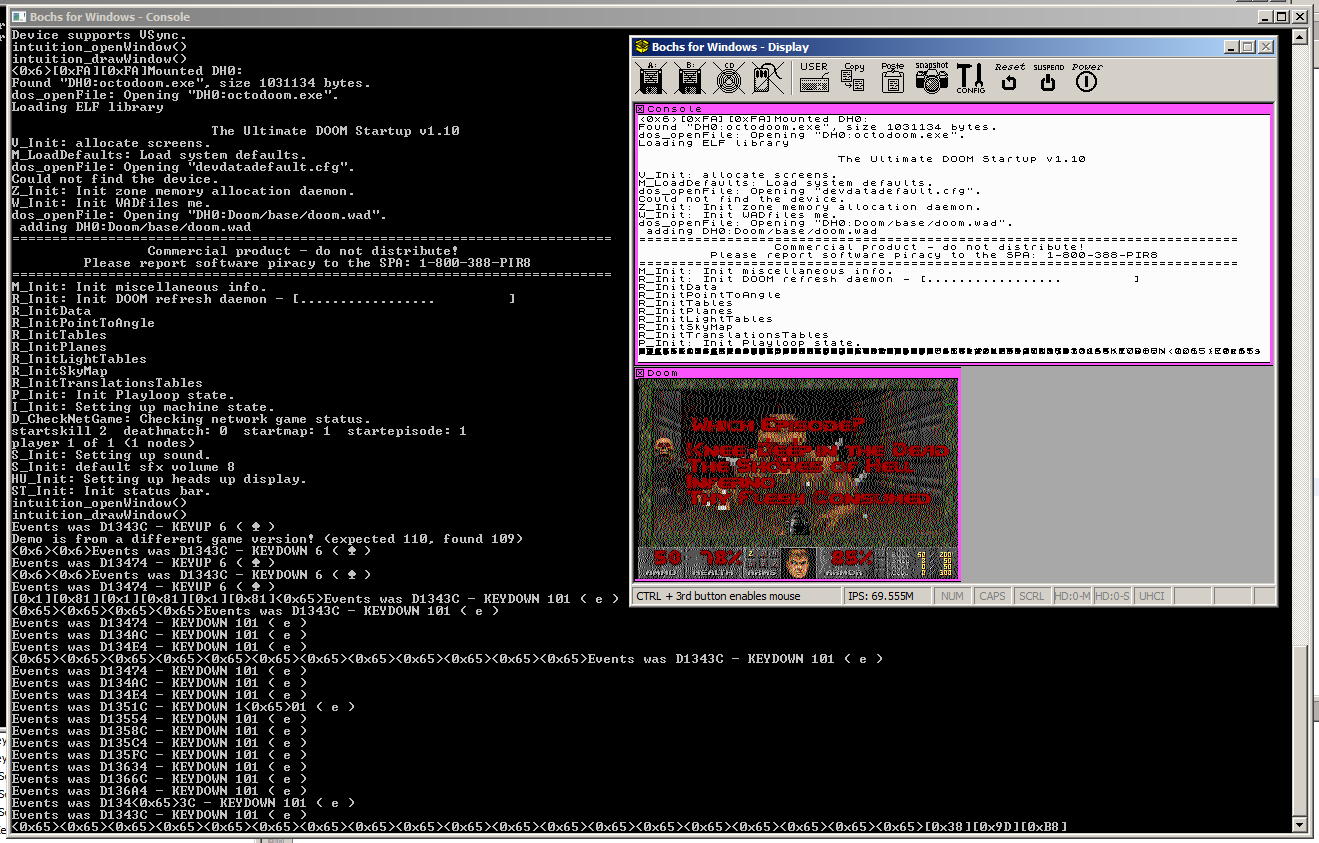
All this in place and it works a treat.  Doom loads, then goes into the menu, and starts the game, leaving the character standing at the beginning of level 1.  \ o /

(The screenshot is from a slightly later test where some keyboard events are wired in ... spoliers)